
If you run separate firewall pairs for your internet edge, your DMZ, your internal segmentation, and a partner connection, you're maintaining four times the hardware, four times the upgrade windows, and four times the licensing conversations. Check Point's Virtual System Extension (VSX) exists to collapse that sprawl: one clustered pair of physical gateways hosting multiple fully independent virtual firewalls, each with its own policy, its own routing domain, and its own administrative boundary.
The diagram below shows a reference VSX deployment of the kind we design and build — let's walk through it.
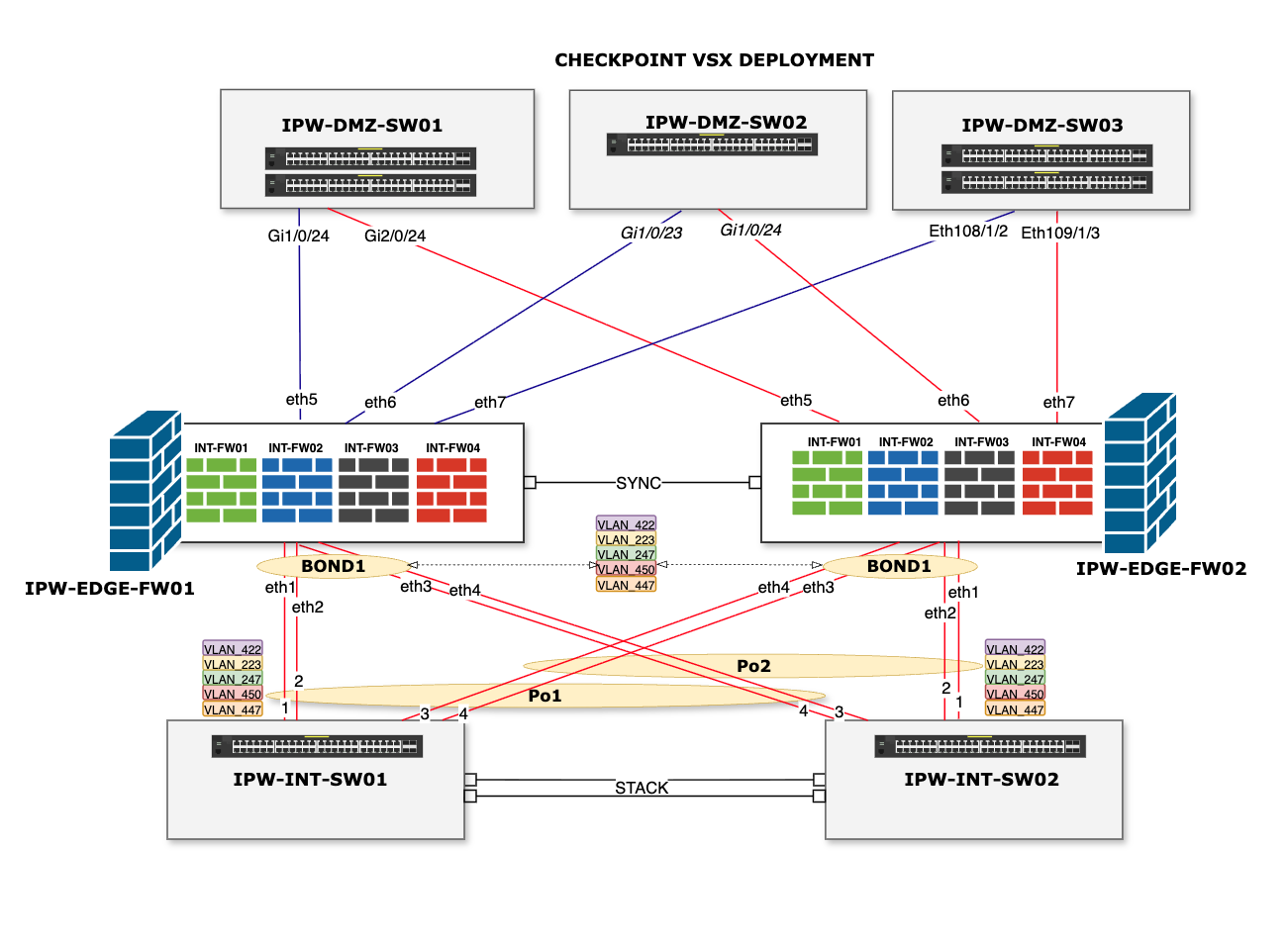
Two physical gateways, one cluster. IPW-EDGE-FW01 and FW02 are the VSX gateways, joined by a dedicated SYNC link. That link carries state synchronisation — connection tables, so established sessions survive a failover — and it gets its own physical interface for a reason: sync traffic competing with production traffic is a classic self-inflicted outage. Keep it isolated, always.
Four virtual systems per gateway. Inside each physical box sit INT-FW01 through INT-FW04 — four independent virtual firewalls. Each virtual system has its own rulebase, its own interfaces, its own routing table, and can be managed by different teams if needed. A misconfiguration in one VS does not touch the others; a policy push to one does not interrupt the rest. This is the core VSX proposition: consolidation of hardware without consolidation of blast radius.
Bonded links southbound. Each gateway aggregates eth1–eth4 into BOND1, an 802.3ad (LACP) bundle trunking VLANs 422, 223, 247, 450 and 447 down to the internal switching layer. Bonds buy you two things at once: bandwidth aggregation and link-level resilience — losing one member interface degrades capacity rather than connectivity.
A stacked internal switch pair. IPW-INT-SW01 and SW02 are stacked, presenting as one logical switch, with the firewall bonds distributed across both physical members via port channels Po1 and Po2. That cross-member distribution matters: either switch can fail entirely and both firewalls retain their bonds, just at reduced capacity. Resilience is only real when you've traced every failure path.
Dual-homed DMZ switching northbound. Three DMZ switches (IPW-DMZ-SW01–03) each connect to both VSX gateways on eth5–eth7. Whichever gateway holds the active role for a given virtual system, every DMZ segment remains reachable.
A VSX deployment succeeds or fails on details that never appear in the datasheet:
Virtual system placement. With ClusterXL in Virtual System Load Sharing (VSLS) mode, individual virtual systems can be active on different physical members — FW01 carrying two VS actively, FW02 carrying the other two — so both chassis do useful work instead of one idling as a standby. Weighting that distribution against actual traffic profiles, not guesswork, is where capacity planning earns its keep.
Sizing for the sum, surviving on one. The cluster must run the entire virtual system estate on a single member during failover or maintenance. If the pair only performs while both are healthy, you've built a system that's fine right up until the moment you need it not to be.
Trunk discipline. Every VLAN reaching the firewall bond is an attack surface decision. The five VLANs trunked here are deliberate; "allow all VLANs" on a firewall-facing trunk is how segmentation quietly dies.
Upgrade choreography. VSX upgrades touch every virtual system on a member. The payoff of consolidation is that one well-planned maintenance window covers what used to be four — but it has to be well-planned: VS failover order, sync verification, and rollback criteria agreed before anyone types cpstop.
VSX earns its place when you have multiple distinct security domains — internet edge, DMZ tiers, internal segmentation, third-party connections — currently spread across ageing discrete firewall pairs, and you want fewer boxes without merging policies or teams. It's equally strong for managed service scenarios: one physical estate, per-customer virtual systems, clean administrative separation.
It's the wrong tool when a single high-throughput perimeter policy is all you need (a plain ClusterXL pair is simpler), or when the organisation lacks the operational maturity to plan shared-fate maintenance — because consolidated hardware means consolidated change windows, and that discipline has to exist before the migration, not after.
We design, migrate, and manage Check Point, Fortinet, and Palo Alto estates for UK organisations — including VSX consolidations from discrete firewall sprawl. A network health check is usually the right starting point: we'll map what you have, what it costs you to run, and what a consolidated design would actually look like.